

Hold tight - Your download link is on its way to your inbox.
Auto video editor
for spoken footage
Clean up silences, filler words and bad takes in your recording. Review the cuts, keep what matters, then export a video or continue in your desktop editor.
Free includes one AI-edited hour per month. Sign up to export. Free MP4 exports include a watermark; editor timeline exports require a paid desktop plan. See current plans.
Continue on your computer
Copy or share this page. On your computer, choose the web or desktop app.
You can also select and copy the page link above.A cleanup pass
for what you said
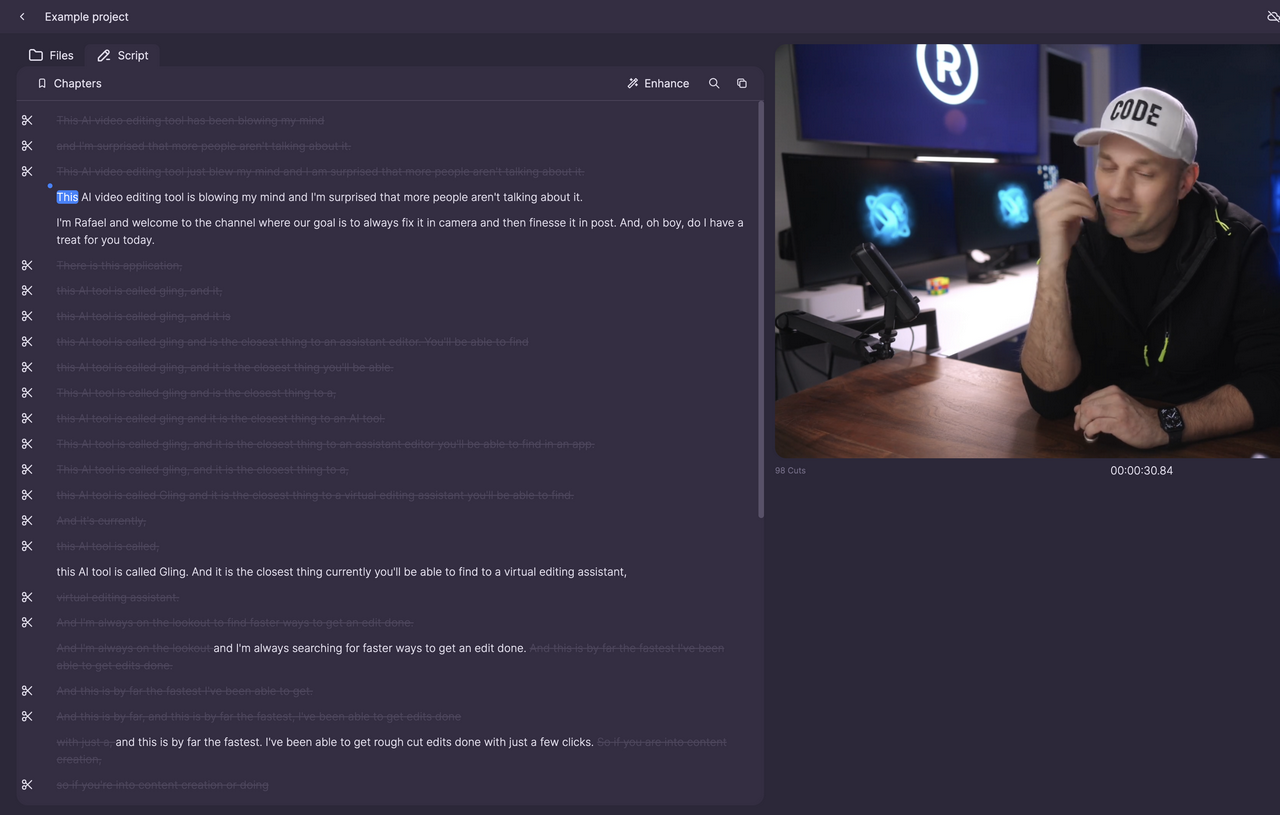
Start with raw spoken footage: a talking-head video, tutorial or recorded explanation. Gling finds cleanup candidates so you can spend your review on the recording.
You still choose the pacing and the takes that tell the story.
- SilencesShorten unwanted gaps. Keep pauses that give a thought room to land.
- Filler wordsReview unwanted “um” and “uh” moments. Listen across the cut before keeping it.
- Bad takesReview repeated attempts and mistakes. Restore the take you prefer.
Review before you export
Listen around the proposed cuts, check the transcript against what was said, and adjust what stays. The Example project lets you explore a recording with preloaded edits.
Choose where the edit goes next
Export media from Gling, or carry the reviewed cuts into a desktop editor.
Export a video
Export a cleaned MP4 without continuing in another editor. Sign-in is required to export; Free MP4 exports carry a watermark.
Continue in your editor
With a paid desktop plan, export an editor timeline for Premiere Pro, DaVinci Resolve or Final Cut Pro. Keep your original media available and check the imported cuts before finishing.