At its core, an AI talking head video generator is a tool that lets you create a video of a digital person—an avatar—speaking a script you’ve written. The real magic here is that you can produce a professional-looking video without ever touching a camera, setting up lights, or booking a studio. This technology tackles the biggest hurdles in video production head-on: the high costs and the painfully slow turnaround times.
The Future of Video Content Is Already Here
The move away from complicated, budget-draining video shoots toward fast, AI-driven creation isn't just a trend; it's happening right now. If you're a marketer or a content creator, you know the pressure to churn out video is relentless, but budgets and time are always tight. This is exactly where an ai talking head video generator stops being just another piece of software and becomes a genuine strategic advantage.
Think about it. Instead of juggling schedules, scouting locations, and wrestling with equipment, you can put all your energy into your message. The concept is simple but incredibly effective: take a piece of text—a blog post, a company announcement, a training module—and turn it into a compelling video in just a few minutes.
Let's look at a quick comparison to see how different the workflows really are.
Traditional vs AI Talking Head Video Production
As you can see, the difference is stark. AI generators remove the logistical nightmare from the equation, letting you focus purely on the content itself.
A Market That's Exploding
This isn't some niche technology for early adopters. It’s a full-blown market shift responding to a massive need. The AI video generator market is on a trajectory to grow from USD 788.5 million in 2025 to an incredible USD 3,441.6 million by 2033.
What’s driving this? The numbers tell the story. While 91% of businesses are all-in on video marketing, a huge 80% admit they struggle with the cost and time it takes to produce it. AI-powered tools can cut those production expenses by up to 45%, suddenly making consistent video creation possible for almost anyone.
This technology levels the playing field. It empowers individuals and small teams to produce high-quality, consistent video at a scale that was once only possible for large corporations with deep pockets.
It's More Than Just a Neat Trick
Ultimately, bringing an AI generator into your workflow is about staying competitive in a world that overwhelmingly prefers video. It’s a practical way to breathe new life into your best written work, giving it a face and a voice to connect with audiences on platforms like YouTube, LinkedIn, or in your training portals.
If you’re ready to see what's out there, this guide on the 12 Best AI Video Generators for Creative Teams is a great place to start your search. This whole approach is a cornerstone of modern content strategy, and you can learn more about how AI is transforming content creation for YouTube right here on our blog.
Planning Your First AI-Generated Video

Before you even think about clicking a single button in an AI talking head video generator, your video's success is already being decided. It all comes down to your plan. A solid plan is your blueprint, the one thing that separates a truly engaging video from a robotic script reading. The very first step is getting crystal clear on your purpose and your audience.
What's the goal here? Is this a quick tutorial, a deep-dive product demo, or a thought leadership piece for LinkedIn? Figuring this out sets the entire tone. A script for a technical walkthrough needs to be direct and to the point. A video for social media, on the other hand, should probably be more energetic and way shorter.
Turning Written Content into a Spoken Script
Most people start with content they already have, like a blog post. That’s a great shortcut, but just copying and pasting is a mistake I see all the time—it leads to flat, boring videos. You have to remember that writing for the ear is a completely different skill than writing for the eye.
Your job is to translate that formal, written language into something that sounds like a real person talking. Just think about how you speak. You use shorter sentences and simpler words. That's the goal.
Here’s my process for making that switch:
- Chop up long sentences. If you have to take a breath halfway through a sentence, it's too long for a video. Break it into two or three shorter, punchier ones.
- Simplify your language. Swap out stuffy words. Instead of "subsequently," just say "next." Instead of "utilize," say "use." It makes the content feel more natural and less like a machine is reading it.
- Read everything out loud. This is non-negotiable. If it feels weird or clunky coming out of your mouth, it's going to sound even worse when the AI says it. Tweak it until it rolls off the tongue.
How to Structure a Script That People Actually Watch
A good script structure is what keeps people from clicking away. I always think of it in three simple parts: the hook, the core message, and the call to action.
Your hook is that critical first sentence that has to grab someone's attention instantly. The middle—your core message—should be broken down into clear, easy-to-follow points, almost like using subheadings in an article. And finally, you have to tell them what to do next. Whether it's "visit our website" or "subscribe for more tips," your call to action gives the video a purpose.
The quality of your AI-generated video is a direct reflection of the script you feed it. A conversational, well-paced script will produce a lifelike and engaging result. A dense, formal text will just create a monotonous video.
Here's a pro tip: write pauses directly into your script. It's as easy as typing "(pause)" or just using an ellipsis (...). These little breaks mimic how real people talk and give your audience a second to digest what they just heard. This tiny trick can make a massive difference in how human your final video feels.
Bringing Your Digital Persona to Life: Avatars and Voices
With your script locked in, it's time for the fun part: building your digital presenter. This is where you breathe life into your script, giving it a face and a voice that can connect with your audience. The first big decision is what your on-screen presence will look like.
You’ve really got two main paths here. The quickest way forward is to grab a pre-built stock avatar. These are professionally designed, come in a wide range of styles, and are ready to use in seconds. The other option is to create a custom avatar by uploading a quick video of yourself, essentially making a digital version of you.
Choosing Your Avatar
Stock avatars are a fantastic choice when you need consistency, like for corporate training videos or branded marketing content where multiple people are creating videos. They keep everything looking uniform.
On the flip side, a custom avatar creates a much stronger, more personal bond with your audience. If you're building a personal brand, teaching a course, or just want people to feel like they're connecting with a real person, this is the way to go.
Here's how I think about it when advising creators:
- Speed vs. Connection: Stock avatars get you moving fast. A custom avatar feels more authentic and helps build trust with your viewers.
- Brand Identity: Is your brand represented by one person or is it more of a collective team effort? A custom avatar is perfect for a solo founder, while stock options are great for a larger company.
- The Long Game: If you plan on being the face of your content for the foreseeable future, spending a few minutes creating a custom avatar is a brilliant investment.
For a deeper dive into the tech and possibilities, this article on AI Avatar Videos Explained is a great resource.
Finding the Right Voice
The voice is just as important as the face. The wrong one can make your entire message fall flat, sounding robotic or just plain awkward. Most AI video platforms have a huge library of high-quality AI voices you can sift through, with different languages, accents, and emotional tones. You can find everything from upbeat and friendly to serious and professional.
And just like with avatars, you can also clone your own voice. This usually just involves reading a short script so the AI can capture your personal speaking style. When you pair your own custom avatar with your own cloned voice, you get a startlingly realistic digital twin. We actually have a whole guide with more tips on getting that YouTube voice over just right.
My rule of thumb is simple: match the voice to the video's goal. A calm, steady voice is perfect for a tutorial. An energetic, dynamic voice will sell a product much more effectively.
It's no surprise this technology is taking off. Talking head AI generators are a huge part of the text-to-video market, which now accounts for about 45% of the total market share. Creators can now produce a high-quality video with a custom presenter in under an hour—something that used to take a full 10-20 hours of work.
Generating and Refining Your Video Masterpiece
Alright, your script is solid and you've chosen your digital presenter. Now for the fun part: actually creating the video. This is where all that prep work really starts to matter as you dial in the settings in your chosen AI talking head video generator to get a solid first version. I always think of this first pass as creating high-quality clay—it's got all the right components, but it's not the finished sculpture just yet.
Most tools will first have you set the scene. You can usually pick from a library of stock backgrounds, upload a custom image with your own branding, or just stick with a simple, clean color. This is also a good time to add any text overlays or titles. Think about using them to introduce a new section, call out a key takeaway, or display a call to action. These little details make a big difference in how professional the video feels.
The Real Work Begins After Generation
Let's be honest: no AI is going to give you a perfect video on the first try. The real magic happens when you get your hands on that initial draft and start refining it. This is where you elevate a decent AI video into something truly great. Tools like Gling are a huge help here because they let you edit the video by simply editing the text transcript.
This text-based approach is a total game-changer. Instead of scrubbing through a timeline looking for an awkward pause, you just find the gap in the transcript and delete it. Simple. If the AI messes up a word's pronunciation, you don't have to start from scratch. Just fix the typo in the text, and the audio magically updates.
This process diagram breaks down the fundamental choice you make at the start: picking the right avatar and voice.
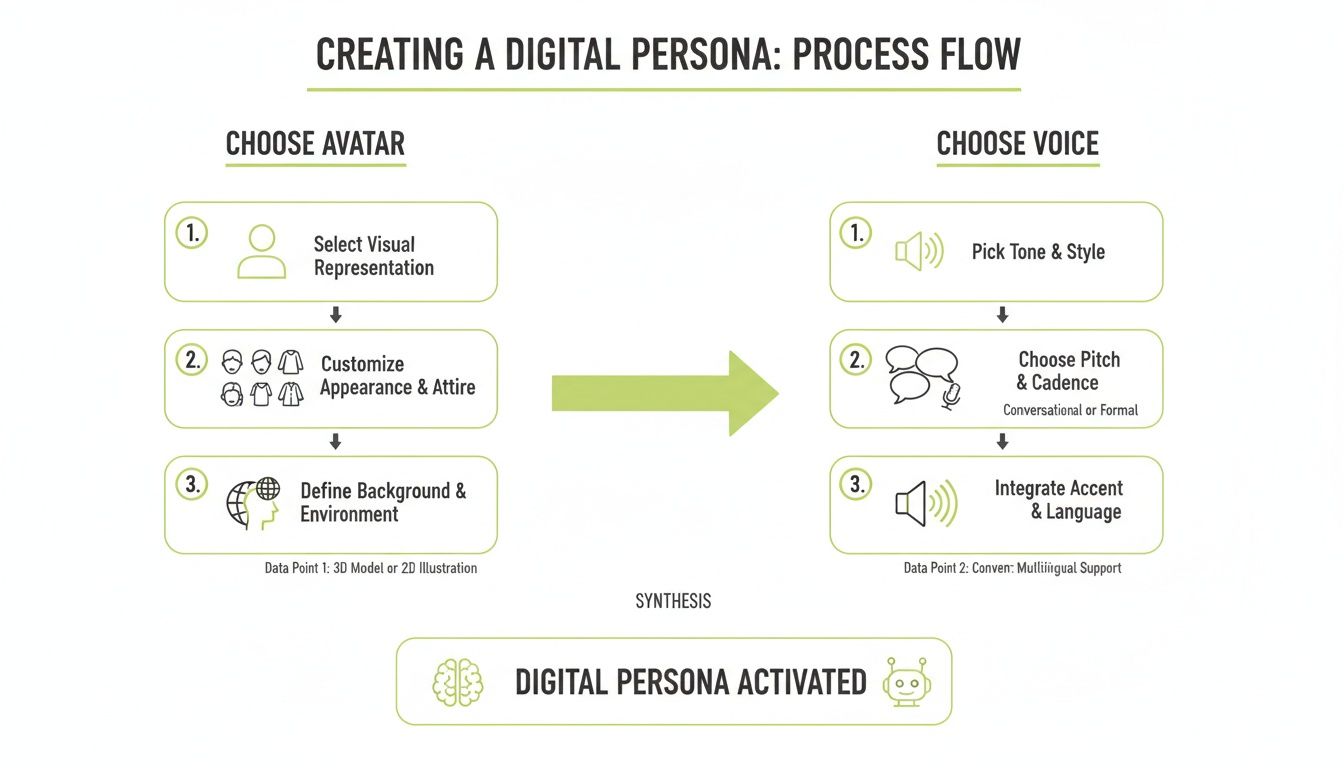
As you can see, getting this combination right is a straightforward but absolutely critical decision. It really sets the tone for everything that follows.
Polishing Your Video With AI-Assisted Tools
Once you’ve cleaned up the basics, you can use other AI features to make your video more engaging. One of the biggest wins here is captions. Subtitles are non-negotiable these days; they make your content accessible and grab viewers who watch with the sound off. Instead of the painstaking process of typing them out, you can generate accurate captions in a single click. We have a full guide on how to add subtitles to videos if you want to dive deeper.
Another great trick is to add some subtle camera movement. You can use AI to create slow zoom-ins on important points or add smooth pans to keep the viewer’s eye engaged. It’s a simple way to break up a static shot and make the video feel much more dynamic, all without ever needing an actual camera operator.
Remember, hitting the 'generate' button is just the starting line. The real quality comes from a smart, efficient editing process where you're using AI as a powerful assistant, not as a final decision-maker.
This is exactly why these tools are catching on so quickly. It boils down to two things: huge cost savings and incredible efficiency. Research shows that generative AI can cut average video production costs by a whopping 45%. A traditional talking head video can easily run you $5,000-$10,000, but an AI generator turns that into a predictable monthly subscription. This frees you up to focus on what actually matters—your message.
Getting Your Video Seen: Smart Distribution and Responsible AI Use
Creating a great video with an AI talking head video generator is a huge first step, but the job isn't done until your audience actually sees it. A fantastic video without a distribution plan is just a file sitting on your hard drive. The real goal is to get your new content in front of the right people on the right platforms.
This means you can't just post the same thing everywhere. Each platform has its own vibe and audience expectations.
On a discovery-focused platform like YouTube, it's all about playing the long game with SEO. I've found AI tools to be incredibly helpful here. You can ask them to generate a dozen different SEO-friendly titles, letting you pick the one that really pops. They can also draft keyword-rich descriptions and even create timestamps for video chapters, which makes your content easier to navigate and boosts its visibility in the YouTube algorithm.
But when you move over to a professional network like LinkedIn, the strategy changes completely. You'll want to post a shorter, punchier clip—maybe just a key takeaway from your full video. The text you write alongside it should be geared toward starting a professional conversation, perhaps ending with a thought-provoking question for your network.
Being Transparent About Using AI
Once you start putting your AI-generated videos out there, you're entering an important conversation about using these tools responsibly. This tech is incredibly powerful, and that means we have a duty to be transparent with our audience. Being upfront is simply the best way to build and keep their trust.
It's not just about what you create; it's about how you present it. Transparency with your audience isn't a legal requirement in most places yet, but it's a fundamental part of ethical content creation and building a loyal community.
Honestly, it doesn't take much. A simple disclaimer in your video description, like "#AIAvatar" or a note saying, "This video was created using an AI presenter," does the trick. This small act of honesty keeps viewers from feeling tricked and helps normalize the use of these amazing creative tools.
Understanding the Rules of the Road
Beyond being transparent with your viewers, you've got to be mindful of the rules set by the platforms themselves, not to mention general copyright laws. Every social media site has its own terms of service that might have something to say about AI content.
Here are the main things you need to have on your radar:
- Platform Policies: Take a few minutes to check the terms of service for any platform you're posting on. Some are starting to introduce specific disclosure requirements for synthetic or AI-generated media.
- Copyright Compliance: If you’re repurposing content—say, turning a blog post into a video—double-check that you actually own the rights to the original material. You can’t just grab someone else’s article and turn it into a script.
- Avatar and Voice Licensing: The AI talking head video generator you're using has its own licensing agreements for its avatars and voices. Read the fine print to make sure you know how you can use them, especially if it's for commercial purposes.
By combining a smart distribution strategy with a solid commitment to ethical and legal practices, your AI videos will do more than just reach a big audience—they'll build your reputation as a trustworthy creator.
Got Questions About AI Video Generators? We Have Answers
Diving into AI video creation can feel like stepping into a whole new world. The technology is evolving so quickly that it's natural to have a few questions about what's really possible. Let's clear up some of the most common ones so you can get started.
Can I Actually Use My Own Face and Voice?
You bet. This is where modern AI talking head video generators really shine. The best tools on the market let you create a custom digital version of yourself.
The process is simpler than you might think. You just record a short, high-quality video of yourself talking to the camera. The AI then studies that footage to capture your likeness, your specific mannerisms, and the unique sound of your voice. Once it's done, your digital persona is saved and ready to narrate any script you throw at it.
For anyone building a personal brand—coaches, educators, consultants, you name it—this is huge. It means you can show up with an authentic, personal touch in all your videos without having to physically film every single time.
How Real Do These Avatars Actually Look and Sound?
We've come a long way from the clunky, robotic avatars of the past. The technology has reached a point where the avatars from top-tier generators are shockingly lifelike. We're talking natural facial expressions, subtle head movements, and spot-on lip-syncing that matches the audio perfectly.
Of course, quality isn't uniform across the board; it definitely varies between platforms. But the leading tools can produce an avatar that's practically indistinguishable from a real person on a typical video call or in a social media clip.
My advice? Always check out recent examples from the platform you're considering. Better yet, jump on a free trial. There’s no substitute for seeing the quality for yourself to make sure it meets your brand's standards before you go all in.
Do I Need to Tell People My Video Is AI-Generated?
The laws around AI are still playing catch-up, but when it comes to your audience, transparency is always the best policy. It's considered a solid ethical practice to let your viewers know they're watching an AI presenter.
You don't need to make a huge deal out of it. A simple disclaimer is usually all you need.
- Add a hashtag like
#AIgeneratedin your post. - Include a short sentence in your video description, like "This video features an AI avatar of our founder."
This small step keeps you from ever being accused of deceiving your audience and, honestly, helps normalize this incredible technology. For more sensitive topics like news, finance, or health, this kind of disclosure is even more critical.
How Hard Is It to Turn a Blog Post into a Video?
This is one of the most common and powerful ways people use these tools, and the answer is: it’s incredibly easy. Many AI video generators are built specifically for this kind of content repurposing.
Often, the workflow is as simple as pasting a link to your article. The platform’s AI will read the text and automatically pull out the key points to create a video script. From there, you just pick your avatar and voice, make any final adjustments, and hit "generate." It’s an unbelievably efficient way to breathe new life into your best-written content and connect with a whole new audience on platforms like YouTube and LinkedIn.
Ready to turn your content into polished videos without the hassle? With Gling, you can create a professional talking head video from any link or use our intuitive text-based editor to perfect your own recordings in minutes. Start creating faster and smarter at https://gling.ai.