Picture this: your video’s entire dialogue laid out like a simple Word document. A YouTube transcript AI is a tool that does exactly that, automatically converting everything you say into a text file. But its real magic isn't just turning speech to text; it’s that this text becomes a "living script" you can use to edit your video.
Instead of hunting through a timeline, you can now shape your final cut just by deleting and rearranging words on a page.
What Is YouTube Transcript AI and Why It Changes Everything
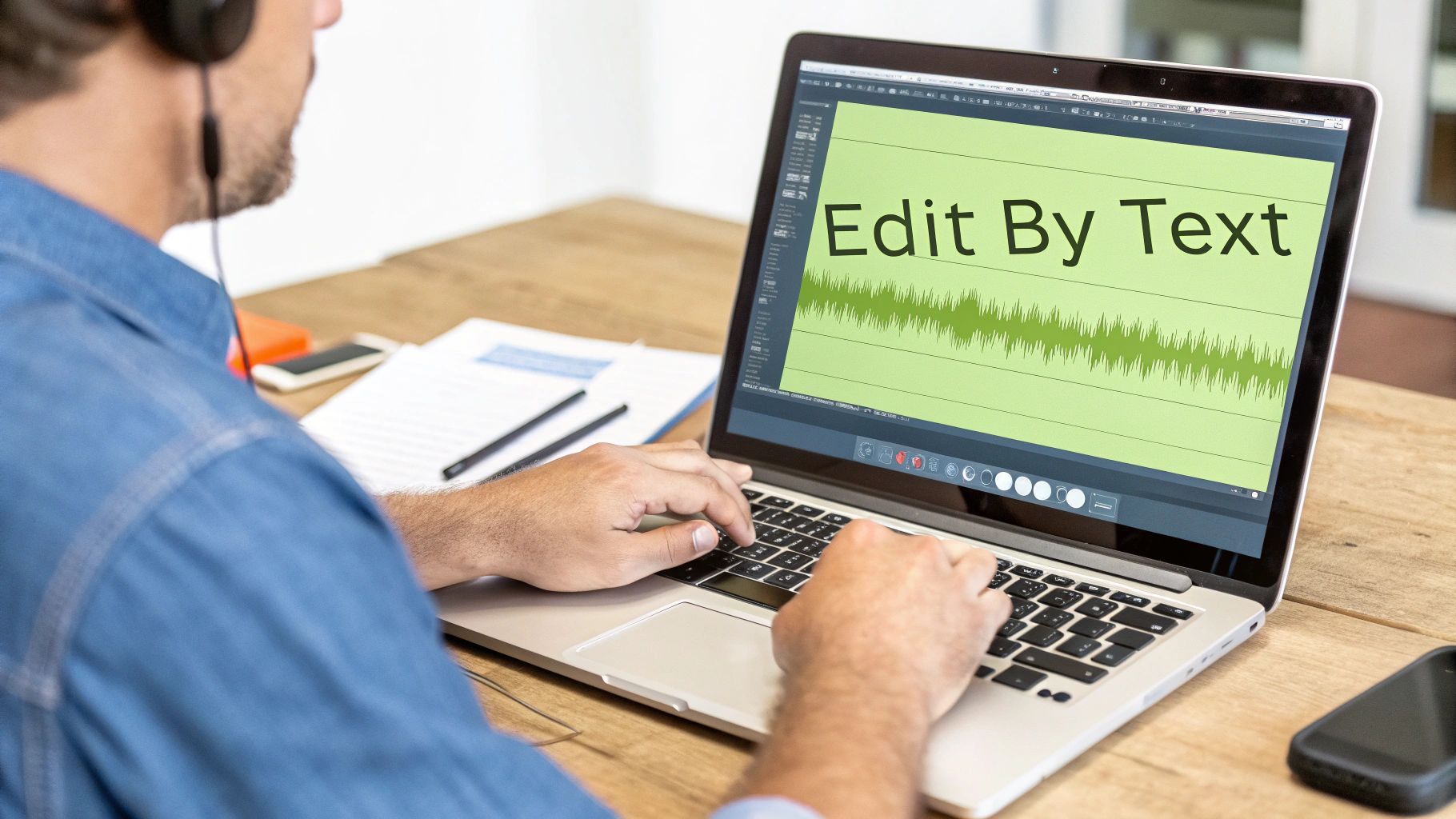
Anyone who has edited video the old-school way knows the drill. You’re constantly scrubbing through a visual timeline, trying to pinpoint that one awkward pause or filler word. It’s a slow, painstaking process of making tiny cuts over and over again, which can absolutely kill your creative momentum.
Now, let's flip that on its head. An AI generates a perfect transcript of your video. To get rid of an "um" or an "uh," you just find the word in the text and hit delete. Poof. The corresponding audio and video segment is gone from your timeline.
Need to cut an entire section where you fumbled your words? Just highlight the whole paragraph and delete it. Instantly, your video is tighter and more professional. This is what a YouTube transcript AI brings to the table—it turns video editing from a clunky visual puzzle into a fast, intuitive, text-based workflow.
This shift allows creators to focus on the story and the message, rather than the mechanics of cutting clips. It's about editing with your mind, not just your mouse.
The Old Way Versus The New Way
The difference in how you spend your time is massive. A task that once took hours of meticulous timeline surgery can now be knocked out in just a few minutes of reading and refining a document. It's a big reason why the global AI transcription market, currently valued at $4.5 billion, is expected to skyrocket to $19.2 billion by 2034.
This text-first approach doesn't just save you a ton of time; it also makes the whole editing process feel more fluid and accessible, opening up new creative possibilities. If you're new to this concept, learning how to transcribe video to text is a great place to start building a foundational understanding.
To really see the difference, let’s compare the two workflows side-by-side.
Traditional Timeline Editing vs. AI Transcript Editing
This table breaks down the fundamental differences in workflow, time investment, and creative focus between traditional video editing and modern AI transcript-based editing.
Ultimately, moving to a text-based workflow is one of the most significant ways AI is transforming content creation for YouTube. It gives you back your most precious resource as a creator: your time.
How Does an AI Actually "Listen" to Your Videos?
Ever wondered what’s happening under the hood when you upload a video and a full script appears almost instantly? It’s not magic, but it is a pretty sophisticated process. Think of it like training a brand new assistant to be the world's fastest and most accurate typist.
First, you have to give that assistant a massive library to study. AI transcription models are fed enormous amounts of data—we’re talking millions of hours of audio that has been painstakingly transcribed by humans. By analyzing this huge dataset, the AI starts to build connections between specific sounds and the letters, words, and phrases they represent.
The more it "listens," the smarter it gets. The AI learns to recognize patterns in human speech, figuring out different accents, speaking speeds, and even the subtle quirks that make our language so complex. This is the foundational training that gives a YouTube transcript AI the power to turn your spoken words into a workable script.
From Sound Waves to Sentences
So, what happens when you actually upload your video? The trained AI kicks into gear, running a series of steps that take just a few seconds to complete. It’s a lightning-fast sequence of analysis and prediction.
Here's a breakdown of the four key stages:
- Acoustic Analysis: The first thing the AI does is break down your audio into its smallest units of sound, called phonemes. For instance, it hears the word "cat" not as a single sound, but as the distinct phonetic pieces: /k/, /æ/, and /t/.
- Phonetic Conversion: Next, it matches those phonetic building blocks to the words it learned during its training. The AI's programming tells it that the sequence /k/ /æ/ /t/ almost always forms the word "cat."
- Language Modeling: This is where things get really clever. The AI uses its knowledge of grammar, context, and common phrases to predict the most likely sequence of words. If it hears something that sounds like it could be "I scream" or "ice cream," it looks at the surrounding words to make an educated guess. This predictive ability is why a good AI can often nail transcriptions even when there’s a bit of background noise.
- Refinement and Formatting: In the final step, the system cleans everything up. It adds punctuation like periods and commas, capitalizes words where needed, and can even identify different speakers. This last bit of polish is what turns a raw jumble of words into a structured, readable document.
This entire process, from breaking down sounds to adding the final punctuation, is what elevates a tool from simple speech-to-text into a powerful text-based video editor. The goal isn't just to capture the words; it's to create a script you can immediately start working with.
Knowing how this all works helps you understand both the incredible power and the occasional quirks of AI. It's a pattern-recognition machine, so it excels at things it has heard before. But it might need a quick human review to catch unique names, industry jargon, or specific brand terms it’s never encountered. That blend of AI speed and human oversight is what makes for a truly efficient workflow.
Your New Text-Based Video Editing Workflow
If you've ever felt bogged down by traditional video editing—scrubbing through timelines, staring at audio waves—then switching to a text-based workflow will feel like a breath of fresh air. Instead of a complex interface, you're looking at a simple document. This single change makes the whole process feel more natural and cuts hours of tedious work down to just a few minutes of focused polishing.
The real power of using a YouTube transcript AI is its simplicity. You're not hunting for mistakes on a timeline; you're reading for them in a script. This lets you concentrate entirely on your video's message and pacing, editing your footage just like you would a blog post or an article.
This isn't just a novelty; it's quickly becoming the new standard. Strategic AI adoption across businesses is expected to hit 68%, and for content creators, this means a major shift. Tools that were once experimental are now essential, especially as younger creators embrace them—a whopping 70% of Gen Z have already used generative AI. This reflects a fundamental shift in how work gets done.
The Five Steps to Effortless Editing
Getting started with this workflow is surprisingly easy. Platforms like Gling are built to make every step feel intuitive, even if you’ve never edited video this way. The whole point is to get you from a pile of raw footage to a polished final cut with as little friction as possible.
Here's a look at the simple, five-step process:
- Upload and Transcribe: Just drop all your raw video files into the editor. The AI immediately starts analyzing the audio and spits out a complete, word-for-word transcript. This whole process usually only takes a few minutes.
- Review and Correct: Give the transcript a quick once-over. The AI is incredibly accurate, but it’s always smart to check for any unique names, brand terms, or specific jargon that might need a quick fix.
- Edit by Deleting Text: This is where the magic really happens. To get rid of filler words like "ums" and "ahs," just find them in the text and hit delete. Instantly, the corresponding video and audio are snipped from your timeline. Mess up an entire take? Just highlight that whole paragraph and delete it. Gone.
- Generate AI Captions: Once your script is clean and your video is tight, you can generate perfectly synced captions from the final transcript with a single click. This instantly makes your content more accessible to a much wider audience.
- Export Your Final Video: When the edit is done, you can either export your video directly as an MP4 file or send it over to professional software like Adobe Premiere Pro or Final Cut Pro for final touches like color grading and graphics.
This entire approach makes video editing feel less technical and more creative. To get a better sense of what's happening under the hood, the diagram below breaks down how the AI turns your spoken words into editable text.
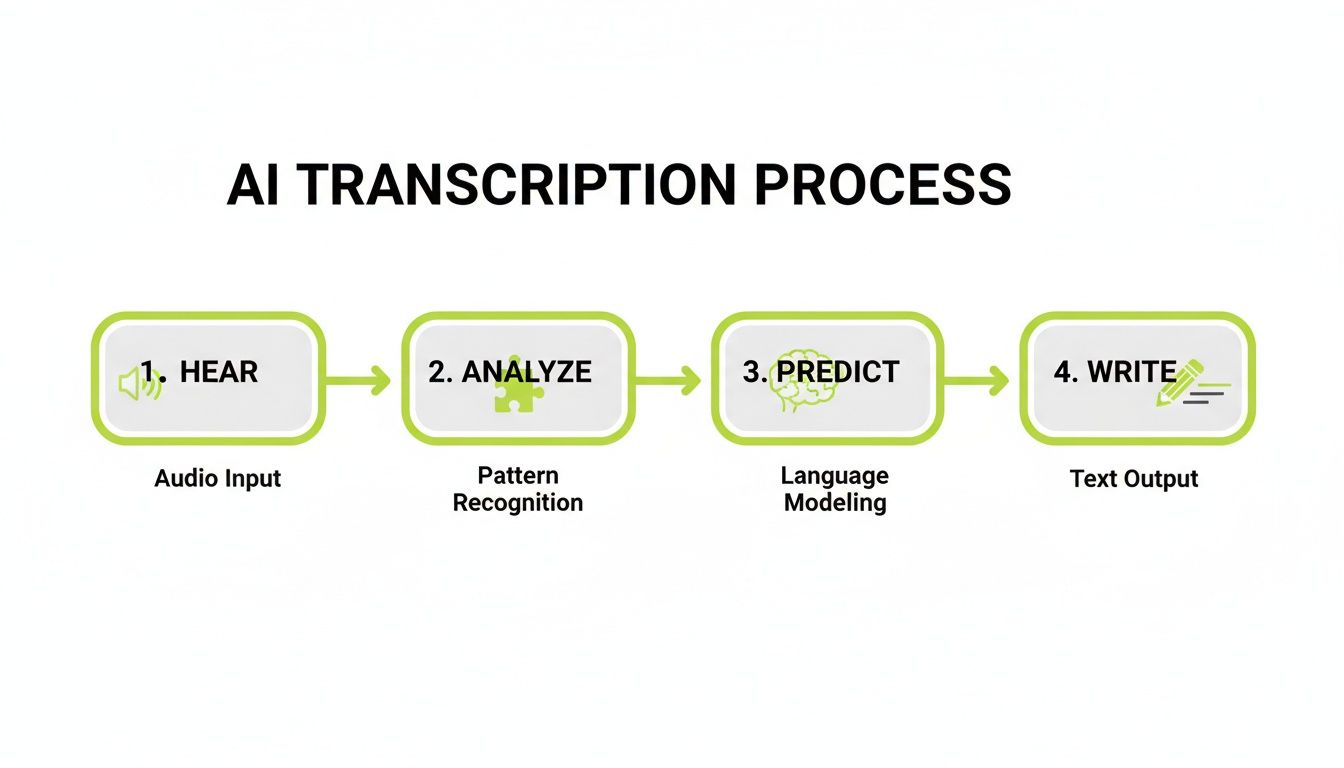
This four-stage flow—Hear, Analyze, Predict, Write—is the engine that powers text-based editing. It’s what allows the AI to give you a highly accurate script to work with, fast.
Putting It All Into Practice
Seeing this workflow in action is where it all clicks. Editing becomes a process of reading and refining, which is a skill most of us already have, unlike scrubbing through a video timeline.
By treating your video like a document, you can make bold creative decisions faster. You can easily see the structure of your narrative, identify weak points, and tighten your script without getting lost in the technical details of a traditional editor.
This change doesn't just save you a massive amount of time; it genuinely helps you produce tighter, more engaging content. If you're curious about the impact, it's worth seeing how a text-based video editor saves time for YouTube creators. The efficiency you gain means less time spent on repetitive cuts and more time brainstorming your next great video idea.
Using Transcripts to Boost Your Channel's SEO and Accessibility

Beyond just making your editing life easier, an accurate transcript from a YouTube transcript AI is a secret weapon for growing your channel. It tackles two of the most important aspects of audience growth every creator needs to master: search engine optimization (SEO) and accessibility.
Think of these as two sides of the same coin. One helps people find your videos, and the other ensures they can actually enjoy them once they get there.
Turn Your Spoken Words into Searchable Gold
Search engines like Google are incredible at reading text, but they can't "watch" your video to figure out what it's about. This is where your transcript becomes the crucial link, translating everything you say into a language that search algorithms can understand and index.
Suddenly, your video isn't just ranking for the few keywords in your title and description. It’s now searchable for every single phrase you utter. Imagine someone searching for a super-specific solution like "how to fix a wobbly tripod leg." If you mentioned that exact phrase at the 12-minute mark of your video, your transcript puts you on the map for that search.
Pro Tip: Don't wait until after you've filmed. Plan your target keywords and common audience questions before you even hit record. This way, your script—and therefore your transcript—is already loaded with the exact terms people are looking for.
As search evolves, optimizing content for AI search is becoming more important than ever, and a detailed transcript is a massive piece of that puzzle.
Open Your Content to a Wider Audience
Accessibility is more than just a box to check; it’s a direct path to a larger, more loyal audience. A clean transcript is the first step to creating high-quality closed captions, which are non-negotiable for several groups of viewers.
Here’s who you’re helping by adding captions:
- Viewers who are deaf or hard-of-hearing: For them, captions aren't a convenience—they're the only way to access your content.
- People watching with the sound off: A staggering 85% of social media videos are watched on mute. Whether they're on a noisy train or in a quiet office, captions let them follow along.
- Non-native speakers: Reading along can dramatically boost comprehension for viewers who are still learning the language you're speaking.
Making your videos accessible is one of the best ways to build an inclusive community. A YouTube transcript AI makes this whole process feel almost automatic, transforming a once-tedious task into a simple step that pays off in both reach and viewer loyalty.
How to Quickly Fix Common AI Transcription Errors
Even the best AI transcript generators aren't quite perfect. They get you incredibly close—say, 95% of the way there—but that last 5% is where a quick human review really shines. Think of the AI as a brilliant but slightly inexperienced assistant. It does all the heavy lifting, and your job is just to give it a final quality check.
This isn't about starting over. Not even close. It's more like a quick proofread, a final polish to catch the handful of common mistakes that AI models still make. When you're working in a text-based editor, zapping these little errors takes just a few seconds and guarantees your final captions are pristine.
Catching Common AI Mistakes
AI models are getting better every single day, thanks in no small part to the massive investment pouring into the field. In fact, AI infrastructure spending is projected to grow at a 28% compound annual growth rate in the coming years. You can learn more about the growth of AI infrastructure in this video. But even with all that progress, some classic errors still manage to sneak through.
Here’s what you should keep an eye out for when you're giving your transcript that final once-over:
- Proper Nouns and Brand Names: An AI might hear you say "Gling" but write "gling" or even "G-Ling." Fixing these little capitalization and spelling quirks keeps your branding sharp and professional.
- Homophones: These are the classic tricky words that sound identical but mean different things. Think "their," "there," and "they're." The AI usually gets it right from context, but sometimes it just guesses wrong.
- Technical Jargon or Acronyms: If you’re deep in a niche, you probably use specific terms like "SaaS," "DSLR," or "API." AI can easily mishear these, so a quick "find and replace" is your best friend here.
- Accents and Mumbling: Let's be honest, we all mumble sometimes or have accents that can trip up an algorithm. This can result in some pretty odd word choices that need a quick manual fix.
A simple proofread transforms the transcript from a raw AI output into a polished, professional script. This final step is crucial for both viewer experience and search engine optimization.
Fixing these mistakes is a breeze in a text editor. A super-efficient trick is to play the audio back at 2x speed while you read along with the text. Your brain will instantly catch anything that doesn't sound right, and you can type in the correction without ever needing to mess with a complex video timeline.
This tiny bit of effort ensures your video’s captions and all the searchable text are 100% accurate. For a deeper dive, check out our guide on how to transcribe video to text.
Frequently Asked Questions
Jumping into AI-powered video editing can feel like a big leap, and it's natural to have a few questions. I've pulled together the most common ones I hear from creators who are just getting started with YouTube transcript AI.
Think of this as your quick-start guide to understanding the nuts and bolts. We’ll cover everything from accuracy and cost to dealing with multiple speakers so you can feel confident hitting the ground running.
How Accurate Is a YouTube Transcript AI?
Honestly, they’re incredibly accurate these days. Most top-tier AI transcription tools hit 95-98% accuracy when the conditions are good. That means clear audio, not a lot of background noise, and one person speaking at a time. For most YouTube videos, that's more than enough to get the job done right out of the box.
Now, things like thick accents, people talking over each other, or super technical language can sometimes throw the AI for a loop, and you might see the accuracy dip a bit. But here’s the upside: because you're working with a text editor, fixing those few mistakes is a breeze. It’s usually just a matter of a quick proofread and a few keystrokes.
Can These Tools Handle Multiple Speakers?
Absolutely, and this is where the magic really happens for certain types of content. Many of the more advanced platforms can automatically tell who is speaking and label the dialogue accordingly.
If you’re making interview content or a video podcast, this feature is a lifesaver. Instead of one giant, confusing wall of text, the AI breaks it down neatly:
- Speaker 1: "Welcome back to the channel."
- Speaker 2: "It's great to be here."
This simple organization makes it so much easier to follow the flow of the conversation and pinpoint the exact moments you want to cut. Your whole workflow stays cleaner, especially when you're juggling multiple people's dialogue.
Does Editing the Transcript Affect My Original Video Files?
Nope, and this is a huge relief for a lot of creators. Editing your video by changing the text is a non-destructive process. When you highlight and delete a sentence in the transcript, you aren't actually erasing anything from your original video files.
Your raw footage stays completely untouched and safe. The software simply uses your edited transcript as a roadmap to assemble a new video sequence. This gives you total freedom to experiment, undo mistakes, and try different edits without ever worrying about losing your source material.
Is Using a YouTube Transcript AI Expensive?
It’s almost always cheaper than the old way of doing things. When you compare the cost of these tools to hiring a professional transcriber or a traditional video editor, it's a no-brainer. The amount of time you get back is usually a massive return on its own.
Most platforms have different pricing tiers, so you only pay for what you use. You'll often find free trials or starter plans, which makes this technology accessible even if you're just starting out. The whole point is to make powerful editing tools available to everyone, not just big studios with deep pockets.
Ready to stop wasting time scrubbing through timelines and start editing at the speed you can read? Gling turns your video's dialogue into a simple script you can edit like a document. Cut out filler words, awkward pauses, and entire bad takes just by deleting text. You can get started for free and see how much time you save.
Composed with the Outrank app