

A spoken caption follows the transcript. A headline, logo or call-to-action graphic is an independent visual element. To place a prepared graphic over your edit, add it as an image overlay.
Prepare and add the graphic
- Create a headline, logo or other graphic in an image editor and save a copy you have permission to use. Use a transparent image when you want the main video visible around it.
- In Gling, select the transcript words where the graphic should appear.
- Choose + Add > B-roll image.
- In the library's Upload tab, add your image and select it for the edit.
- Review the image in the preview. Adjust its timeline position and duration, then check it against the underlying footage.
You can also drag a supported image onto the timeline. Use the B-roll placement and removal controls to manage it.
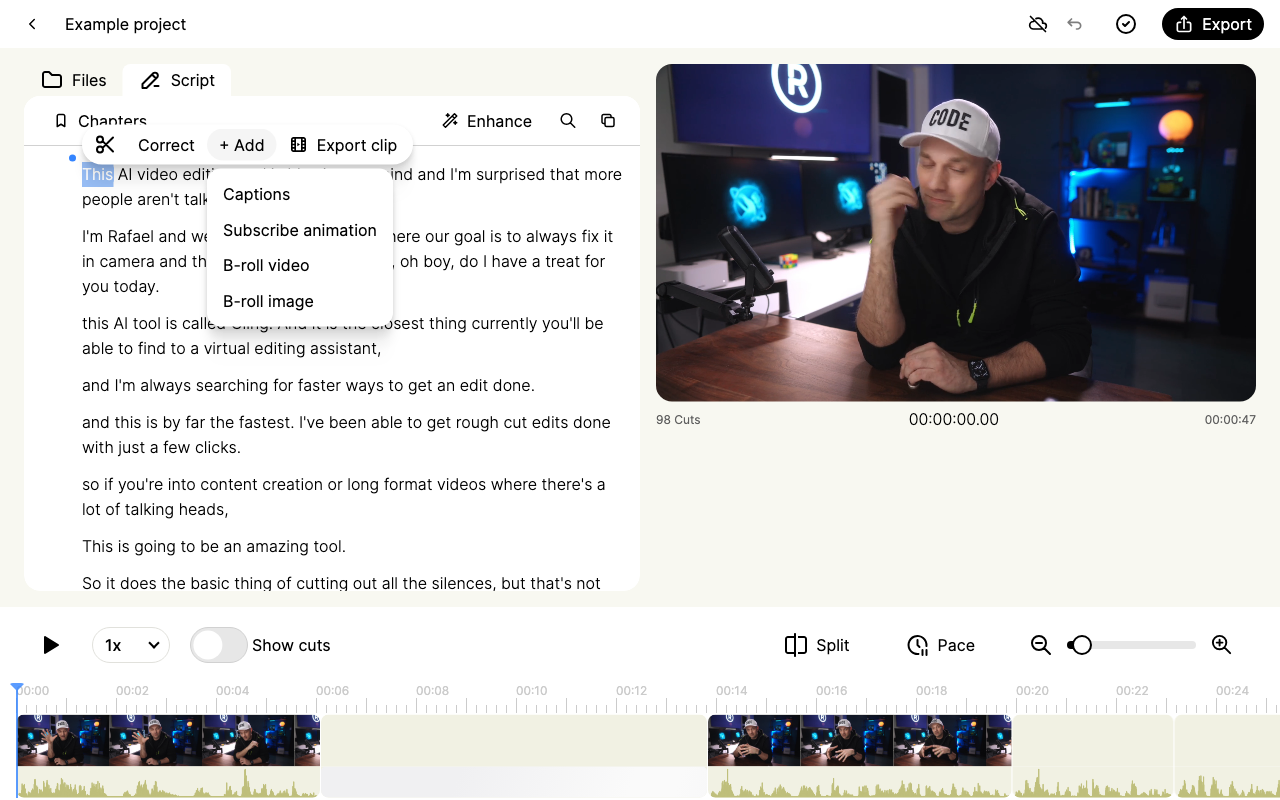
Open the image overlay menu screenshot at full size.
Use the right text workflow
For a misspelled spoken word, use Correct in the transcript. For subtitle appearance, use Caption style. Neither operation is the same as creating an independent headline.
The regular editor's transcript + Add menu offers captions, a subscribe animation, B-roll video and B-roll image. Older beta versions had different text and media tools. If a tutorial shows a control you do not have, include its screenshot and your current version when contacting support.
Reuse and export
Keep your prepared graphics in an organized folder so you can upload them in other projects. Do not assume that copying a project caption setting creates a reusable independent title or that every custom setting transfers to another project.
Export a short MP4 sample to check readability, safe margins and timing. For external-editor work, inspect the overlay after import or add final titles in the destination editor. A timeline handoff does not guarantee identical rendering of every graphic or effect.