

Original recordings, editable project data, generated media and finished exports are different files. Freeing storage safely starts with knowing which copy you are looking at.
Keep the files needed by your edit
- Original recordings: keep them in a stable working folder. Reconnect the drive or grant browser file access if Gling asks for the files again.
- Project data: contains cuts and settings. Local saving and cloud sync are separate; check the project sync guide.
- Generated or cached media: can include playback copies, enhanced audio, thumbnails and B-roll. Some files can be shared by more than one project.
- Exports: an MP4 is a finished result. It is not a complete editable-project backup.
If an export runs out of space
- Check free space on the internal disk and the export destination.
- Keep enough room for the output and any copied media. CapCut's Copy medias option creates additional copies in its project folder.
- Move or remove files you can positively identify as unrelated to active edits, such as old finished exports you have backed up.
- Retry once after addressing the reported problem. Keep the exact error if it fails again.
Do not delete an application's entire media folder, IndexedDB or browser site data as a general way to make room. That can remove data needed by local work.
Delete an unwanted project deliberately
On the home screen, open the project's three-dot menu and choose Delete only when you no longer need that editable project. The current action removes local project data and requests deletion of the remote project; it is not a command to remove only this device's copy.
Do not rely on deleting a project to remove every shared or cached media file, and do not assume a deleted edit can be restored. Preserve original footage and any needed exports first.
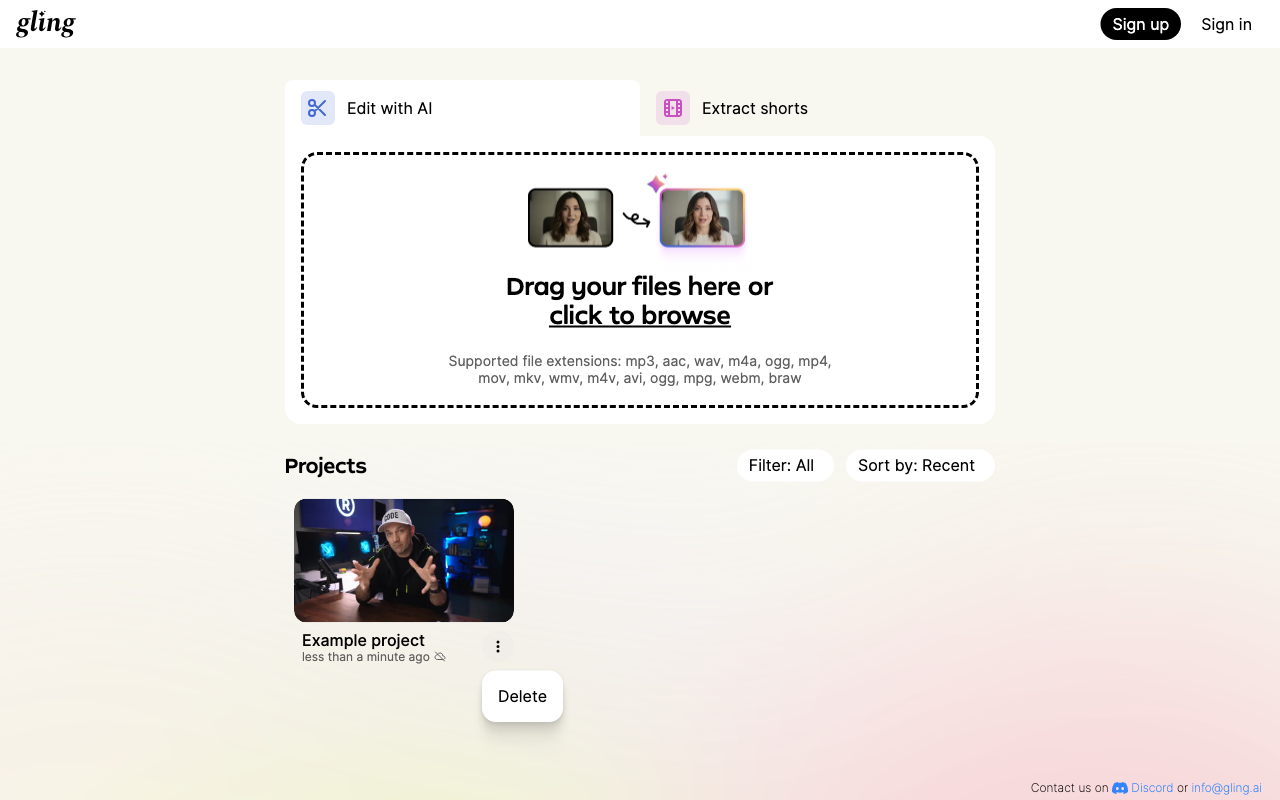
Open the project options screenshot at full size.
Ask before clearing shared application data
If a Gling media folder has grown unexpectedly, contact support with your operating system, app version, available disk space and whether any projects exist only on this device. A cleanup step supplied for one diagnosed case may be unsafe for another setup.
Deleting a project, uninstalling Gling and canceling a subscription are different from requesting account-data deletion.